Example Application
Streams
An infinite scroll product discovery feed powered by image search. Upload an inspiration image and explore an endless stream of matching products.
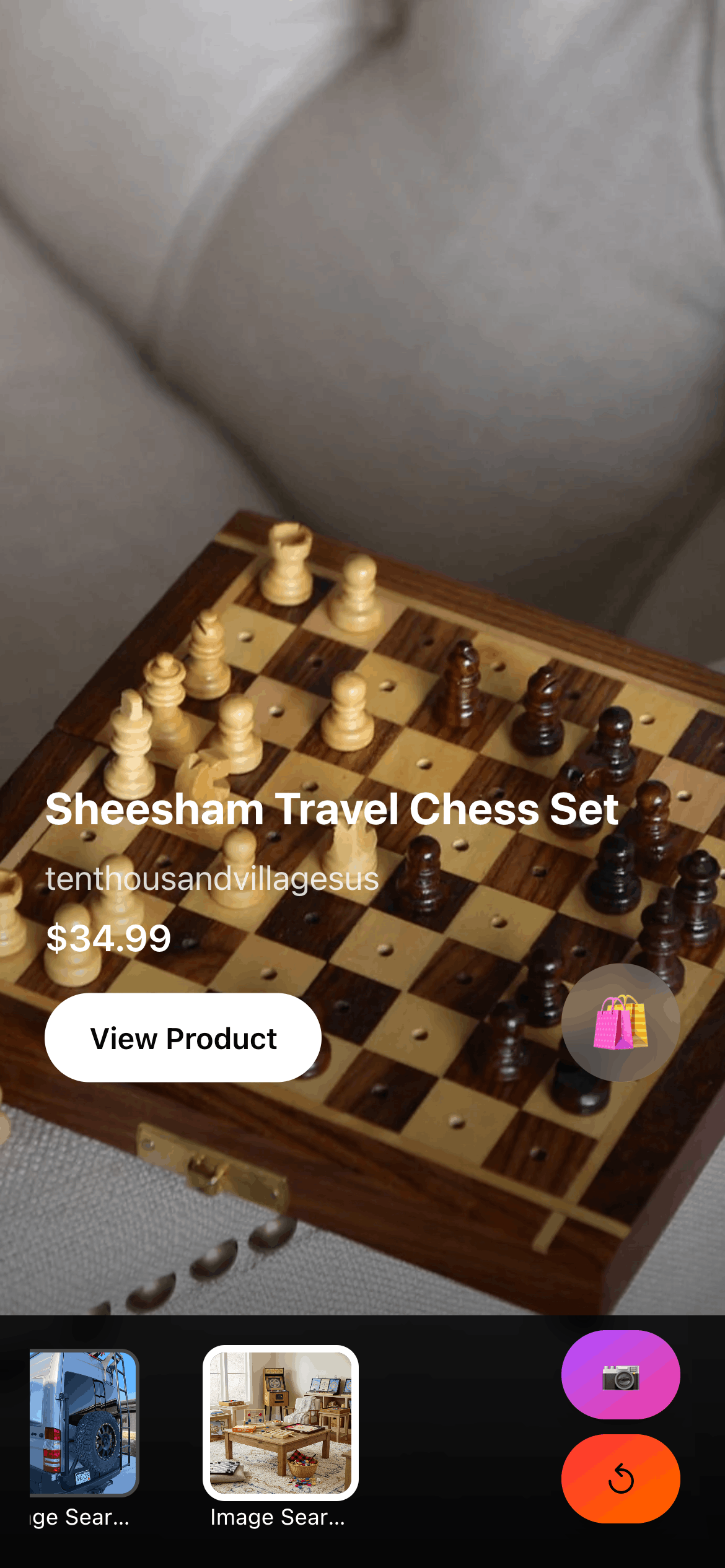
Overview
Streams showcases the core TasteBrain workflow:
- Upload: User uploads an inspiration image
- Discover: App generates an infinite scrolling feed of matching products
- Navigate: User explores personalized product recommendations
Features
- 📸 Image upload with drag-and-drop support
- ∞ Infinite scroll product feed
- 👤 Session-based user tracking (no auth required)
- 🎨 Tailwind CSS 4 styling
- ⚡ Server-side rendering for performance
- 🖼️ Cloudinary CDN integration
Tech Stack
| Layer | Technology |
|---|---|
| Framework | SvelteKit 2 with Svelte 5 |
| Styling | Tailwind CSS 4 |
| Product API | Bestomer Prism (personalized search) |
| Image Hosting | Cloudinary |
| Session | svelte-kit-sessions |
Prerequisites
- Node.js 18+ with pnpm
- Prism API credentials
- Cloudinary account (free tier works)
Setup
1. Install Dependencies
cd examples/streams
pnpm install
2. Configure Environment
cp .env.example .envRequired variables:
# Session secret (generate with: openssl rand -hex 32)
SESSION_SECRET=your_session_secret_here

# Prism API configuration
PRISM_URL=https://api-prism.bestomer.io
PRISM_SECRET=your_prism_api_secret_here

# Cloudinary configuration
PUBLIC_CLOUDINARY_CLOUD_NAME=your_cloudinary_cloud_name
3. Run Development Server
pnpm run devVisit http://localhost:3500
Key Implementation Details
1. Image Upload Flow
async function handleFileUpload(file: File) {
  // Upload to Cloudinary
  const formData = new FormData();
  formData.append('file', file);
  formData.append('upload_preset', 'your_preset');

  const response = await fetch(
    `https://api.cloudinary.com/v1_1/${CLOUD_NAME}/image/upload`,
    { method: 'POST', body: formData }
  );

  const data = await response.json();
  return data.secure_url;  // CDN URL
}
2. Prism API Integration
export const POST: RequestHandler = async ({ request, locals }) => {
  const { imageUrl } = await request.json();
  const userId = locals.session.userId;  // From session

  const response = await fetch('https://api-prism.bestomer.io/search/unified', {
    method: 'POST',
    headers: {
      'Authorization': `Bearer ${PRISM_SECRET}`,
      'Content-Type': 'application/json',
    },
    body: JSON.stringify({
      queries: [{ image_url: imageUrl }],
      n_products: 48,
      n_pool: 500,
      noise: 0.0,
      user_id: userId  // Enable personalization
    })
  });

  const data = await response.json();
  return json({ products: data.results });
};
3. Infinite Scroll
let products = [];
let page = 0;
let loading = false;

async function loadMore() {
  if (loading) return;
  loading = true;

  const response = await fetch(`/api/feeds?page=${page}`);
  const newProducts = await response.json();

  products = [...products, ...newProducts];
  page++;
  loading = false;
}

// Intersection Observer for auto-load
onMount(() => {
  const observer = new IntersectionObserver((entries) => {
    if (entries[0].isIntersecting) loadMore();
  }, { threshold: 0.5 });

  observer.observe(document.querySelector('#scroll-sentinel'));
});
Project Structure
src/
├── hooks.server.ts              # Server hooks (session, env validation)
├── lib/
│   ├── components/
│   │   ├── MediaUploader.svelte     # Image upload component
│   │   ├── ProductFeed.svelte       # Infinite scroll feed
│   │   ├── ProductCard.svelte       # Individual product display
│   │   └── ProductSkeleton.svelte   # Loading skeleton
│   ├── types/
│   │   └── api.ts                   # Prism API type definitions
│   └── utils/
│       ├── api-client.ts            # Prism API client wrapper
│       └── cloudinary.ts            # Cloudinary upload helper
└── routes/
    ├── +page.svelte                 # Main page
    └── api/
        ├── feeds/+server.ts         # Feed generation endpoint
        └── seeds/+server.ts         # Seed management endpoint
Deployment
This app uses @sveltejs/adapter-node for deployment to Node.js environments.
Build for Production
pnpm run build
node build/index.js
Deploy to Cloud Platforms
Vercel (Recommended):
pnpm install -g vercel
vercel
Customization Guide
Change Product Count
body: JSON.stringify({
  queries: [...],
  n_products: 48,  // Change this (typical: 24-48)
  n_pool: 500,     // Candidate pool (typical: 300-1000)
  noise: 0.0
})
Add Brand Filtering
body: JSON.stringify({
  queries: [...],
  n_products: 30,
  n_pool: 300,
  noise: 0.0,
  domains: ['everlane.com', 'patagonia.com']  // Add this
})
Related Examples
- InstaShop - Instagram profile to products
- BookTaste - Literary prose to products
- Dress Code - Wedding guest styling from event details