Example Application
Dress Code
A wedding guest styling app that turns a wedding website or plain-language event description into curated outfits and category-level product recommendations.
What It Does
Dress Code parses wedding details with Claude, generates event-specific search queries, pulls personalized products from Prism, and assembles complete looks for each event in the itinerary.
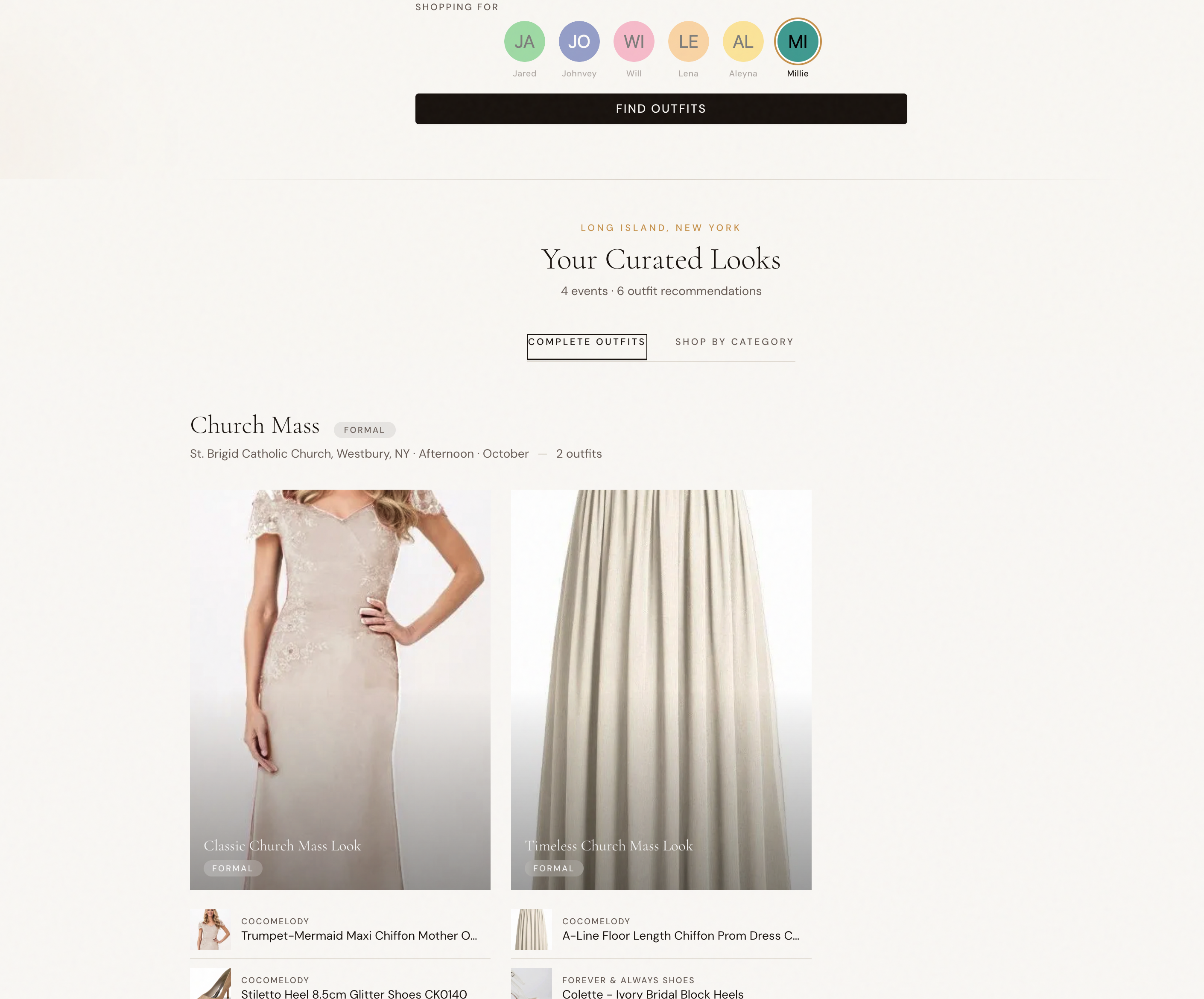
Features
- Flexible input - Accepts either a wedding website URL or a freeform event description
- LLM event parsing - Extracts distinct events, dress codes, locations, seasonality, and overall vibe
- Profile-aware shopping - Switch between curated shopper profiles for women, men, and non-binary shoppers
- Complete outfit assembly - Builds finished looks from category-level Prism search results
- Dual browse modes - View complete outfits or shop deconstructed categories per event
- Website crawl caching - Stores fetched wedding-site markdown in Vercel Blob to avoid repeated crawls
Tech Stack
| Technology | Purpose |
|---|---|
| SvelteKit 2 + Svelte 5 | Full-stack app with server actions and reactive UI |
| Tailwind CSS 4 | Editorial, wedding-style visual system |
| Anthropic SDK | Extract structured wedding events and search queries |
| Prism API | Personalized cross-modal product retrieval |
| ScrapingBee | Fetch wedding website content as markdown |
| Vercel Blob | Cache crawled wedding-site content |
Pipeline
- Input - User pastes a wedding URL or writes a short brief for the event
- Crawl - If the input is a URL, the server fetches and caches the site content
- Parse - Claude extracts events and generates category-specific queries for the selected shopper profile
- Search - Prism runs batched product retrieval for each event/category pair
- Assemble - The app combines products into complete outfits and a category view for shopping
Setup
1. Install Dependencies
cd examples/dresscode
pnpm install
2. Configure Environment
Create a .env file with the required server credentials:
# Personalized product search
PRISM_SECRET=your_prism_token_here

# LLM parsing
ANTHROPIC_API_KEY=your_anthropic_api_key

# Wedding website crawling
SCRAPINGBEE_API_KEY=your_scrapingbee_api_key

# Optional but used by the crawl cache
BLOB_READ_WRITE_TOKEN=your_vercel_blob_token
3. Run Development Server
pnpm run devThen open the local Vite URL shown in your terminal.
Usage
- Select who you are shopping for from the profile picker
- Paste a wedding website URL or describe the event schedule in plain language
- Click Find Outfits to run the full parse-and-search pipeline
- Browse complete looks by event, or switch to the category tab to shop individual pieces
Implementation Notes
- Gender-specific categories control which search queries are generated and how outfits are assembled
- Session storage preserves the current wedding description while the user iterates
- Debug metadata keeps the raw LLM response and parsed input available for inspection
- Category batching keeps the server-side search flow predictable across multi-event weddings
Project Structure
src/
├── lib/
│   ├── components/
│   │   ├── OutfitGrid.svelte          # Event-level outfit grid
│   │   ├── DeconstructedView.svelte   # Category-by-category shopping view
│   │   ├── OutfitCard.svelte          # Individual assembled look
│   │   ├── ProductCard.svelte         # Product result card
│   │   └── DebugPanel.svelte          # Optional pipeline inspection UI
│   ├── server/
│   │   ├── llm.ts                     # Claude parsing and wedding-site crawling
│   │   ├── prism.ts                   # Prism search client
│   │   ├── crawl-cache.ts             # Vercel Blob cache for crawled sites
│   │   └── outfit-assembler.ts        # Complete-look assembly logic
│   ├── types.ts                       # Shared app data contracts
│   └── user-profiles.ts               # Demo shopper profiles
└── routes/
    ├── +page.server.ts                # Main parse/search action
    └── +page.svelte                   # Landing page and results UI
Commands
pnpm run dev
pnpm run build
pnpm run preview
pnpm run check