Example Application
InstaShop
Discover products that match any Instagram profile's aesthetic using TasteBrain AI. Enter a username to analyze their visual style and find matching products.
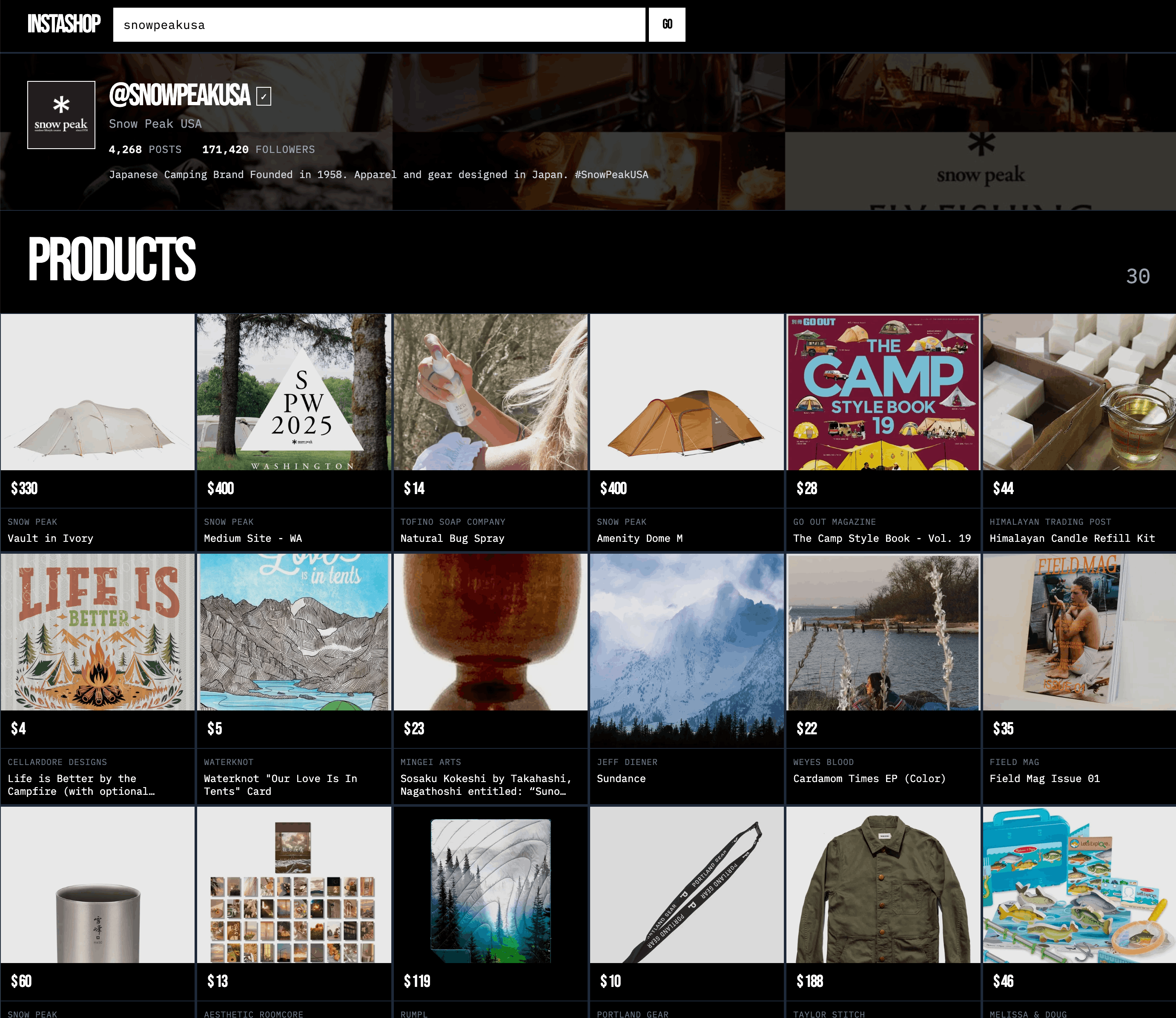
Features
- Instagram Profile Analysis - Fetch profile data and recent posts via Apify API
- Aesthetic Collage Generation - Create 3×4 grid collages using sharp image processing
- Collage Caching - Deterministic caching with 60-80% hit rate (77% faster)
- AI-Powered Product Search - Find matching products via TasteBrain Prism API
- Persistent Caching - Vercel Blob Storage (99% API call reduction)
- Responsive Design - Brutalist aesthetic, mobile-first with Tailwind CSS
Tech Stack
| Technology | Purpose |
|---|---|
| SvelteKit 2 | Full-stack framework with Svelte 5 runes |
| TypeScript | Type-safe development |
| Tailwind CSS 4 | Utility-first styling |
| Apify API | Instagram data scraping |
| sharp | Server-side image processing |
| Cloudinary | Image hosting and CDN |
| Prism API | AI-powered product search |
Prerequisites
- Node.js 18+ (required for SvelteKit 2)
- pnpm (install:
npm install -g pnpm) - Apify API Token - Get from apify.com
- Cloudinary Account - Get credentials from cloudinary.com
- Prism API Access - Contact Bestomer for API token
Setup
1. Install Dependencies
cd examples/instashop
pnpm install
2. Configure Environment
cp .env.example .envEdit .env with your credentials:
# Apify API token
APIFY_API_TOKEN=your_apify_token_here

# Cloudinary credentials
CLOUDINARY_CLOUD_NAME=your_cloud_name
CLOUDINARY_API_KEY=your_api_key
CLOUDINARY_API_SECRET=your_api_secret

# Prism API credentials
PRISM_URL=https://api-prism.bestomer.io
PRISM_SECRET=your_prism_token_here

# Generate random 32-byte hex string
SESSION_SECRET=$(openssl rand -hex 32)
3. Run Development Server
pnpm run devVisit http://localhost:3502
Usage
- Enter Instagram Username - Type
@usernameor full URL - Click Discover - Shows 2-step progress (Checking IG Profile → Curating a Shop)
- View Results - Profile info, collage, and matching products
Example Usernames to Try: @nike, @airbnb, @patagonia
API Flow
The /api/discover endpoint pipeline:
- Validate Username - Normalize input, check format
- Scrape Instagram - Fetch profile + posts via Apify (24hr cache)
- Check Collage Cache - Generate hash from post URLs, check Cloudinary
- Generate Collage (if cache miss) - Download images, create 3×4 grid with sharp
- Upload to Cloudinary (if cache miss) - Upload with deterministic filename
- Search Products - Query Prism API with collage URL
Project Structure
src/
├── lib/
│   ├── components/
│   │   ├── ErrorMessage.svelte      # Type-specific error displays
│   │   ├── LoadingStages.svelte     # 2-step progress indicator
│   │   ├── ProductCard.svelte       # Individual product display
│   │   ├── ProductGrid.svelte       # Responsive product grid
│   │   └── ProfileHeader.svelte     # Instagram profile info + collage
│   ├── server/
│   │   ├── cache.ts                 # Dual-mode caching (Blob/file system)
│   │   ├── cloudinary.ts            # Collage upload and caching
│   │   ├── collage-generator.ts     # sharp-based collage creation
│   │   └── instagram-scraper.ts     # Apify API integration
│   └── types/
│       └── api.ts                   # TypeScript interfaces
└── routes/
    ├── api/
    │   ├── discover/+server.ts      # Main API endpoint
    │   └── proxy-image/+server.ts   # Image proxy (CORS bypass)
    └── +page.svelte                 # Main UI
Performance
Caching Strategy:
- Instagram Cache - 24hr TTL in Vercel Blob Storage (99% API reduction)
- Collage Cache - Deterministic Cloudinary filenames (60-80% hit rate, 77% faster)
- Product Images - Bestomer CDN with WebP, smart cropping
Results:
- Cache hit: <500ms response time
- Cache miss: 2-3s (first request only)
- ~$30/month savings on Apify costs
Deployment
Vercel (Recommended)
pnpm install -g vercel
vercel

# Set environment variables
./scripts/push-env-to-vercel.sh

# Enable Blob Storage in Vercel dashboard
# Deploy to production
vercel --prod
Related Examples
- Streams - Infinite scroll product discovery
- BookTaste - Literary prose to products
- Dress Code - Wedding guest styling from event details