Example Application
BookTaste
A literary discovery app that displays 100 classic books as a virtual bookshelf. Click any book to search for products using its opening line via the Prism API.
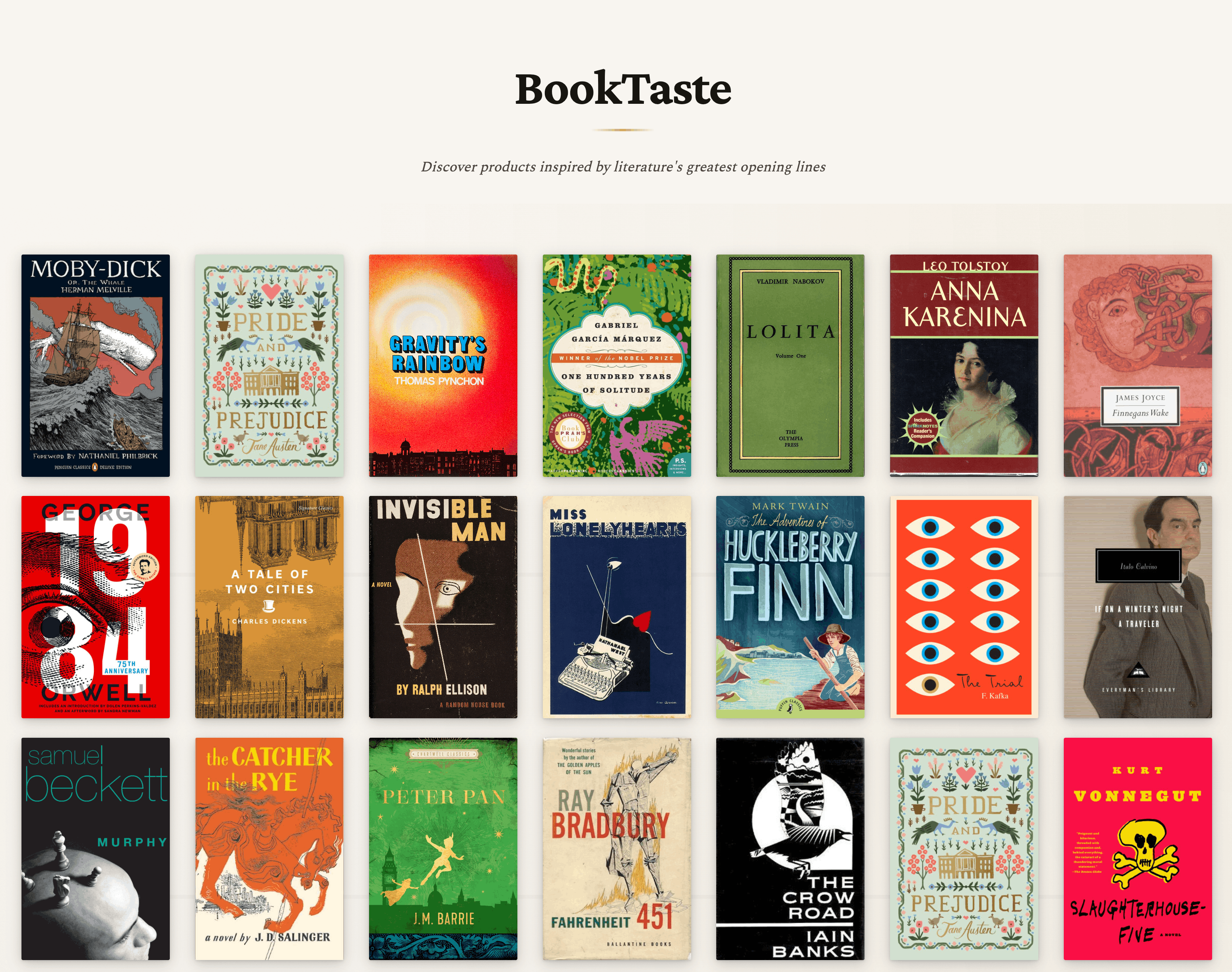
Design Aesthetic
"Literary Antiquarian" - A refined library atmosphere with rich, warm tones evoking aged paper and leather-bound books.
Features:
- Elegant serif typography (Crimson Pro, Spectral, EB Garamond)
- Dramatic book angles with organic shelf layout
- Immersive full-screen modal with staggered product animations
- Rich color palette with burgundy, gold, and forest accents
Tech Stack
- SvelteKit 2 with adapter-vercel
- Svelte 5 with runes for state management
- Tailwind CSS 4 for styling
- TypeScript for type safety
- Prism API for semantic product search
Setup
1. Install dependencies:
pnpm install2. Configure environment:
cp .env.example .env
# Edit .env with your credentials:
# - PRISM_URL=https://api-prism.bestomer.io
# - PRISM_SECRET=<your-token>
3. Run development server:
pnpm run dev4. Open browser:
Usage
- Browse the bookshelf of 100 classic books
- Click any book cover to trigger a product search
- View products inspired by the book's opening line
- Click product cards to open in new tab
- Close modal with X button, ESC key, or backdrop click
Claude Code Build Story
This app was entirely coded by Claude Code with minimal upfront work:
Prerequisites:
- Loaded the
tastebrain@bestomer-svkplugin - Loaded the Anthropic
frontend-designskill - Created
./static/top100.jsonwith book data - Created
.envfile with Prism credentials
Prompts used:
- Initial: "build a new app in @examples/booktaste that presents a display of the top 100 books..."
- Fix serving issue: "the books fail to load because vite will not serve the @top100.json file..."
- Fix linking: "use /calling-prism to change the product link to be pulled from the product_variant_handle key..."
- Optimize images: "use /serving-media-assets to pull the product images from our CDN instead"
Project Structure
booktaste/
├── src/
│   ├── lib/
│   │   ├── types/api.ts              # TypeScript types
│   │   └── components/
│   │       ├── BookCard.svelte       # Individual book display
│   │       ├── BookshelfGrid.svelte  # Grid container
│   │       └── ProductModal.svelte   # Full-screen product modal
│   ├── routes/
│   │   ├── +layout.svelte           # Root layout
│   │   ├── +page.svelte             # Main page
│   │   └── api/search/+server.ts    # Prism API proxy
│   ├── app.css                      # Global styles & design system
│   └── app.html                     # Root HTML template
└── static/
    └── top100.json                  # Book data (served at /top100.json)
API
The app uses a server-side proxy (/api/search) to keep the Prism API secret secure.
Request:
{
  "query": "Call me Ishmael."
}Response:
{
  "products": [
    {
      "id": "uuid",
      "name": "Product Name",
      "brand": "Brand",
      "price": 99.99,
      "currency": "USD",
      "image": "https://...",
      "url": "https://...",
      "similarity": 0.85
    }
  ]
}
Customization
Colors
Edit CSS variables in src/app.css:
:root {
  --accent-burgundy: #6b2737;
  --accent-gold: #c9a961;
  --bg-primary: #f8f5f0;
  /* ... */
}
Typography
Fonts are loaded via Google Fonts in src/app.html. To change fonts, update:
- The
<link>tag inapp.html - CSS variables in
app.css
Deployment
Vercel (Recommended)
pnpm install -g vercel
cd examples/booktaste
vercel login
vercel

# Add environment variables
vercel env add PRISM_URL
vercel env add PRISM_SECRET

# Deploy to production
vercel --prodImportant: Always run vercel commands from the examples/booktaste directory.
Commands
pnpm run dev      # Start dev server (port 3501)
pnpm run build    # Build for production
pnpm run preview  # Preview production build
pnpm run check    # TypeScript type checking
Related Examples
- InstaShop - Instagram profile to products
- Streams - Infinite scroll product discovery
- Dress Code - Wedding guest styling from event details